NC 3D review · video-based cycle-time analysis
FLOWMATIC · MANUFACTURING OPERATIONS AI FOR EXISTING FACTORIES
From one drawingto a running factory.
Connect the process plan, equipment review, NC, quality criteria, and logistics plan required to launch a new product into one workflow. Start with one product or line—without replacing the whole factory—and expand only where the value is proven.
A Factory OS connecting drawings to production, quality, and logistics
Manufacturing Value LoopTARGET · Factory OS
- Planning and layout
- Production
- Quality
- Logistics
- Management decision
- Feedback
Design → Produce → Verify → Move → Decide → Learn
CURRENT PRODUCT PROOF
Current Implementation Scope & Validation Assets
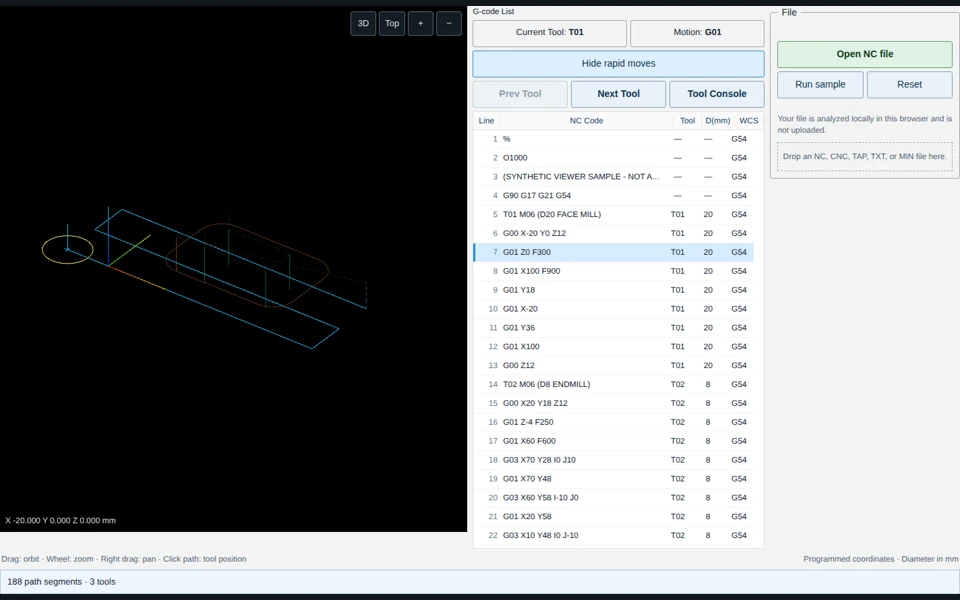
The current validation scope consists of NC/G-code path review and video-based cycle-time analysis. Production impact and ROI are evaluated against the customer's existing process during the Pilot.
CURRENT · PUBLIC DEMO
Machining Intelligence
Visualize existing NC and G-code in 3D to review travel paths and machining sequence.
3D toolpathRapid-move reviewBefore/after comparison
Open NC 3D demoCURRENT · INTERNAL MVP
Operations Intelligence
Compare cycle segments and repeated runs from work video to identify bottleneck candidates.
Segment CTCycle comparisonBottleneck candidates
View CT productFROM DRAWING TO PRODUCTION
Manufacturing Operating Scope: Drawing to Mass Production
Connect the process plans, equipment reviews, NC work, and quality plans that engineering teams manage separately—and feed actual CT, defects, and cost back into the next change.
Product Understanding
Drawing · 3D · tolerance · requirements
Process Design
Routing · split · orientation
Equipment Review
Machine · quantity · requirements
NC Preparation
G-code · path · sequence
Quality Planning
Checks · measurement · correction
Production Operation
CT · downtime · bottleneck · anomaly
Logistics Management
Flow · WIP · supply timing
Continuous Improvement
Actuals → NC · conditions · process
WHY FLOWMATIC
Progressive Automation vs. Full-stack Deployment
Traditional programs often invest in machines, sensors, and connectivity first. Flowmatic starts with manufacturing decisions and execution software, then adds automation only where ROI is proven.
Traditional Full-stack Smart Factory
BUILD FROM THE BOTTOML6Enterprise operation & optimizationManagement · planning · optimization
L5Production · quality · logisticsMES · Quality · Logistics
L4Manufacturing engineeringProcess · equipment · layout
L3Execution & shop-floor dataNC · SCADA · work instruction
L2ConnectivityGateway · Edge · Adapter
L1Machine & controlPLC · Sensor · Robot · AMR
Starting with connectivity can increase upfront cost and implementation time.
Flowmatic Factory OS
START WITH MANUFACTURING DECISIONSL6Enterprise operation & optimizationSTART HERE
L5Production · quality · logisticsSTART HERE
L4Manufacturing engineeringSTART HERE
L3Execution & shop-floor dataSTART HERE
L2ConnectivityCONNECT AFTER ROI
L1Machine & controlCONNECT AFTER ROI
Initial deployment uses existing manufacturing data; machine connectivity is added only after value validation.
The Flowmatic Factory Stack L1–L6 is a product communication model; it is not a claim of equivalence to ISA-95 level definitions.
PROGRESSIVE AUTOMATION
Progressive Automation Using Existing Manufacturing Assets
Full machine connectivity is not required for initial deployment. Drawings, NC, video, and inspection records support the initial workflow; automation is added after value validation.
Initial Application Using Existing Assets
Drawing · 3D modelSTART
NC · G-codeSTART
Work video · CT recordsSTART
Inspection · quality dataSTART
Current work methodsSTART
→
System Integration After ROI Validation
PLC · CNC AdapterCONNECT
Sensor · EdgeCONNECT
Automated CMMCONNECT
AMR · RobotCONNECT
Additional machine dataCONNECT
DELIVERABLES
Production Preparation & Improvement Deliverables
The goal is not just to show data, but to produce decisions and change proposals that manufacturing, quality, and operations teams can use in their work.
Process sequence
Process · OP · Routing
Equipment requirements
Type · quantity · CAPA
Tooling & fixture conditions
Tool · Holder · Datum · Clamp
Layout conditions
Machine · inspection · buffer · flow
NC / G-code changes
Path · sequence · revision
CT bottleneck analysis
Cycle · downtime · bottleneck
Quality plan
Measurement · correction · trace
Automation candidates
Sensor · CMM · AMR · Robot
DESIGN → BUILD → RUN → IMPROVE
Closed-loop Improvement Based on Production Actuals
Do not stop at the initial plan. Feed actual CT, defects, measurements, and downtime back into the next NC, offset, work condition, and process change.
DESIGN
Drawing · process · equipment · quality
BUILD
NC · conditions · standards · logistics
RUN
CT · quality · downtime · cost
IMPROVE
NC · offset · condition · process change
PILOT · 4–8 WEEKS
Pilot Validation Model: One Product / One Line
Measure the current baseline first, apply Flowmatic, then compare time, engineering effort, errors, and loss on the same basis. Expand only where ROI is proven.
Target Workflow Selection
NC review · CT analysis · quality check
Baseline Measurement
Time · effort · errors · loss
Flowmatic Application
Connect existing data and workflow
KPI Comparison
Measure before and after consistently
ROI Assessment
Validate cost and productivity impact
Scope Expansion
Adjacent work · product · line
Lead timeEngineering hoursRevisionsErrorsCycle timeDowntimeInspection lead timeDefect & rework
PRIMARY USERS
Primary Users
Manufacturing engineering · process engineering · quality · line operations
BUDGET OWNERS
Primary Decision Makers
Plant manager · manufacturing leader · operations executive · CEO
EXPAND AFTER PROOF
Customer Expansion Model: Workflow → Line → Factory
Customers do not need to buy the entire Factory OS first. Prove small ROI repeatedly, then expand into adjacent work inside the same factory.
One workflow
Start with a repetitive task such as NC review or CT analysis.
One line
Expand into production, quality, and equipment-state decisions.
One factory
Long term, connect production, quality, and logistics as a Factory OS.
PILOT REVIEW
Pilot Scope Review
A drawing, NC program, or work video is sufficient to define an initial Pilot scope around one repetitive manufacturing workflow.