Manufacturing operations software

Integrated prototype · Internal validation

One Drawing.A Running Factory.

Shared standards for process planning, production and quality at small and medium-sized manufacturers.

Engineering decisions become part of the company’s operating knowledge. Flowmatic connects the review of how a product will be made to the standards used on the shop floor.

Process & machiningCURRENT
Actual product screen · Internal demonstrationEnlarge original ↗
CUSTOMERSManufacturers building repeatable operations
FIRST WORKFLOWNew-product production preparation and line review
INITIAL SCOPEOne product or one line

The problem

Production preparation concentrated in a few experienced people

A new product requires coordinated decisions on processes, equipment, tools, transport and inspection. When information sits across drawings, files and individual experience, each change creates another round of checks and coordination.

Concentrating these decisions in a few specialists makes onboarding and handovers harder, while increasing the burden of managing more products and production lines.

New-product introductionJoint review of process, equipment and logistics conditions
Staff or volume changesHandover and reuse of earlier review criteria

CURRENT · Product

From process review to production preparation and operations

Reviewed machining conditions inform the production plan. The selected plan becomes a reference for workplace operations.

Starting inputsStock and finished-part 3D drawings, target volume, available equipment and layout conditions.

Scrolling advances the screens from 01 to 04. The numbered controls also jump to each step.

Actual product screen · Internal demonstrationEnlarge original ↗
Process and NC view combining 3D geometry, toolpaths and machining code

Product screens show the original Korean interface.

01 / 04Process & machining

Draft process and machining-program review for supported geometry

Stock and finished-part 3D drawings provide the basis for draft processes, tools and machining programs. Engineers review geometry, toolpaths and code together.

Process and NC view combining 3D geometry, toolpaths and machining code
INPUT
Stock and finished-part 3D drawings / Volume / Equipment conditions
OUTPUT
Draft processes, tools and machining programs, with review items
NEXT WORKFLOW
Reviewed machining conditions inform production and logistics planning.

Drafts cover supported geometry. Machine use requires engineering and safety review, followed by on-site validation.
02 / 04Production & logistics

Throughput and waiting-time comparison across machining, transport and washing

Faster machines may not increase total output when the next process creates a queue. Material supply, transport and shared washing are evaluated together to compare alternatives.

Equipment layout, shared logistics and throughput/waiting comparisons
INPUT
Machining conditions / Equipment configuration / Supply, transport and washing
OUTPUT
Projected output, waiting time and work-in-process by scenario
NEXT WORKFLOW
The selected plan informs factory layout and production preparation.

24.28 → 25.65 parts/h is an internal projection for specific assumptions, not a customer result. Waiting can increase in individual cells.

03 / 04Layout & approval

Available-space review and production-management handover

Existing workplaces and free space are reviewed alongside a proposed layout. After an operator approves it, the location and process/equipment criteria are transferred to production management.

Production handover with existing workplaces in blue and the proposed layout in yellow
INPUT
Existing workplace layout / Available space / Reviewed new plan
OUTPUT
Workplace registration linked to location and process criteria
NEXT WORKFLOW
The registered workplace supports production preparation and operations.

This is software workplace registration and plan handover. It is not machine start-up or safety approval.

04 / 04Production operations

Selected plans linked to workplace operating standards

Factory, workplace and line status are shown on the same layout. Production units and process criteria provide a common reference for the next person taking over the work.

The approved workplace displayed in the factory-wide production monitor
INPUT
Approved workplace / Process criteria / Production unit
OUTPUT
Workplace production status and references for related tasks
NEXT WORKFLOW
Connecting shop-floor data to compare forecasts and actuals is a validation objective.

The displayed 30% utilization is demonstration data, not a customer measurement or operating result.

These are separate internal demonstrations of product functions. Inputs and capture times may differ; the logistics comparison is a separate simulation example.

Additional validation assets

CURRENT · NC

NC 3D toolpath review

A public browser demo for reviewing paths and machining sequences in existing NC and G-code.

Open NC demo ↗

CURRENT · CT

Cycle-time analysis from work video

An actual product demonstration comparing segment times and repeated work cycles.

View CT product ↗

Plan-change records and 3D work instructions

Two workflows verified in the integrated prototype. Each case uses a separate synthetic test dataset.

CURRENT · Internal validation

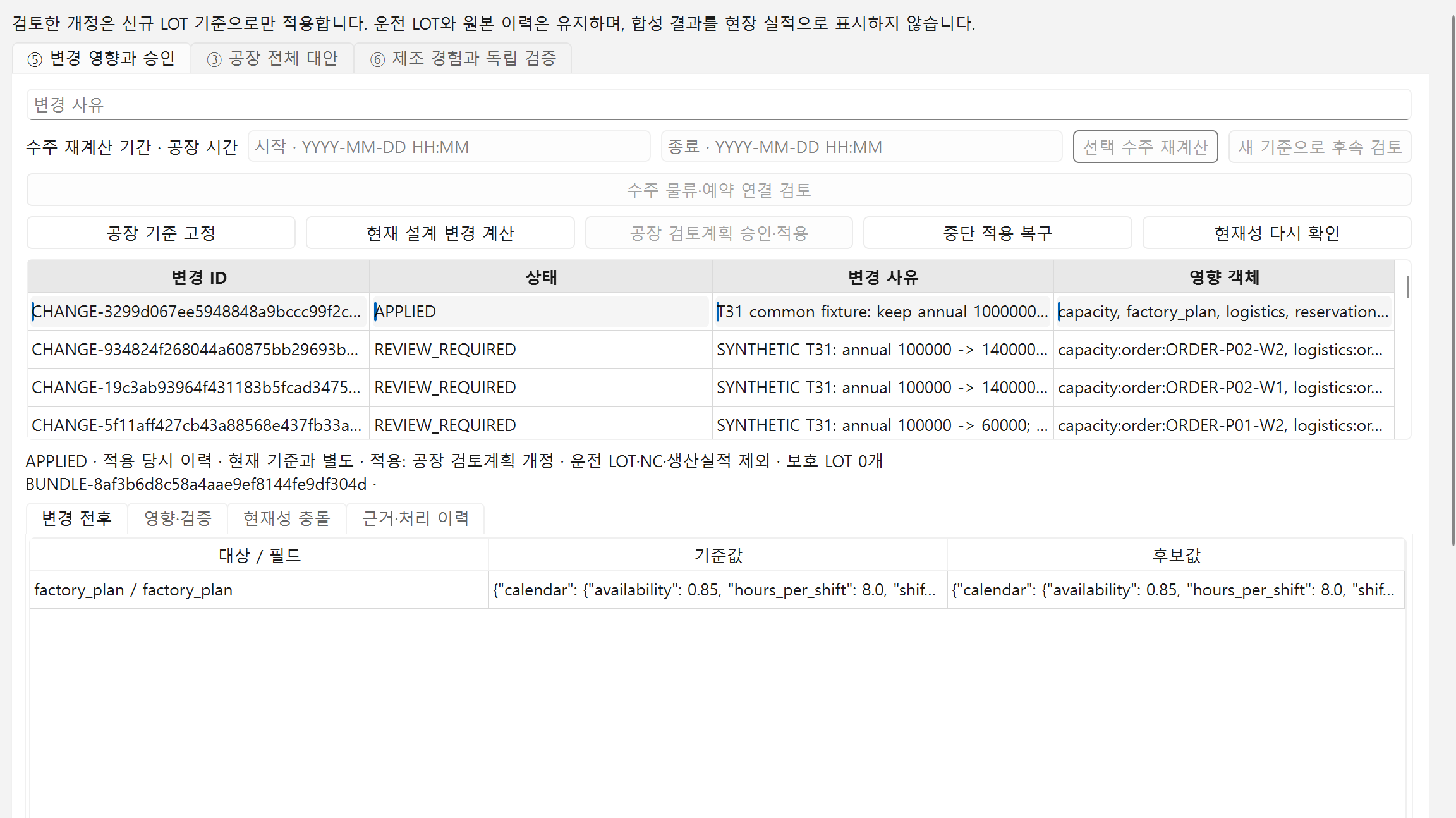
Plan approval and execution criteria after a volume change

Compare alternatives against revised volumes and due dates. A responsible reviewer approves the selected plan before it is applied to work orders and resource reservations. LOT and quality records retain the applied plan and its evidence.

  1. Compare alternativesReview volume, due dates, equipment and logistics together
  2. Approve the planApply the selected plan to work orders and resource reservations
  3. Review the evidenceLink LOT and quality records and check the permitted reuse scope

Synthetic data verifies software links, records and reuse conditions. This is not evidence of customer productivity gains or control of physical equipment.

CURRENT · Internal validation

3D work instructions from machining information

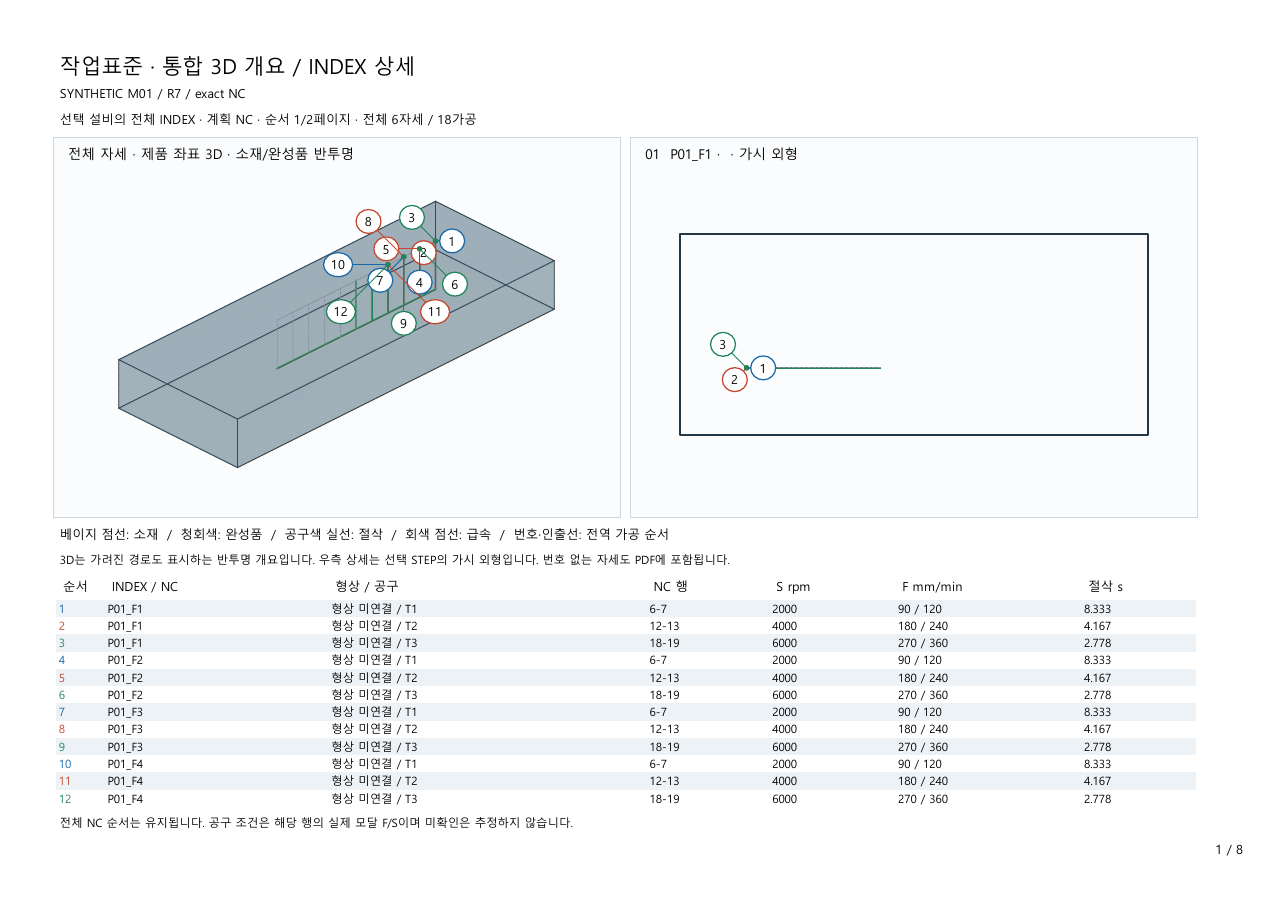
Organize machining paths and operation order by orientation, with a 3D overview and detailed views. Export work instructions containing tools, NC lines, spindle speeds and feed rates to PDF.

  1. Machining informationReview paths, operation order and tool conditions by orientation
  2. Work instructionsCompose the 3D overview and orientation details
  3. Document exportExport a PDF for review and sharing

The public sample uses synthetic geometry and NC in a separate test. It does not establish cutting performance, collision clearance or approval for shop-floor use.

Screens and the PDF are actual outputs from the Korean-language product.

Organizational value

Retained decisions and continuity between people

Recorded conditions and change history help the next person continue from earlier decisions. Flowmatic aims to support handovers and the expansion of production capacity.

ONBOARDING

A reference for new team members

Reuse selected process and equipment conditions and review results.

EXPERT CAPACITY

More products and lines within reach

Aim to reduce repeated information preparation and checking.

CONTINUITY

Linked planning and operating records

Continue work from common workplace and process criteria when responsibilities change.

Organizational benefits will be validated on site through preparation time, staff effort, quality and delivery indicators.

Current implementation and on-site validation scope

CURRENT · Internal implementation and prototype validation

  • Draft processes and machining programs for supported geometry
  • Production-plan comparison under equipment and logistics conditions
  • Factory layout review and handover of selected plans
  • Operating screens organized by workplace and production unit
  • Reviewer-approved work orders and resource reservations with LOT and quality evidence
  • Work-instruction PDF export with a 3D machining overview and orientation details

PILOT · Adoption benefits to validate in customer environments

  • Difference between predicted and actual machining time
  • Time spent preparing and reviewing plans
  • Changes in omissions and rework
  • Installation, configuration effort and operating conditions

Screens show internal demonstrations and simulations. Customer outcomes, automatic control of physical equipment and production safety require separate validation.

TARGET · Factory OS

Progressive automation starting with manufacturing decisions

The target adoption model uses existing information to review processes and production plans first, then adds equipment connections where ROI has been demonstrated.

Factory Stack structure comparison
LayerEquipment-first implementationFlowmatic progressive adoption
L6 Business operations & improvementWorkflow integration after equipment and connectivity setupManufacturing decisions using existing information first
L5 Production, quality & logisticsWorkflow integration after equipment and connectivity setupManufacturing decisions using existing information first
L4 Process, equipment & layout reviewWorkflow integration after equipment and connectivity setupManufacturing decisions using existing information first
L3 Execution criteria & shop-floor dataWorkflow integration after equipment and connectivity setupManufacturing decisions using existing information first
L2 Equipment connectivityEquipment and connectivity setup firstSelected connections after ROI validation
L1 Equipment & controlEquipment and connectivity setup firstSelected connections after ROI validation

This compares adoption structures, not every existing solution. Flowmatic’s L1–L6 is an explanatory framework, not the ISA-95 level definition. The full structure is TARGET; CURRENT is limited to the implementation scope above.

Operating results informing the next plan

DESIGN

Process, equipment and quality plans

BUILD

Machining drafts, layouts and work standards

RUN

Production, quality and operating results

IMPROVE

Result comparison and next-condition review

The complete flow of shop-floor data integration and repeated improvement is a validation and expansion target. Equipment control and condition changes require human review and approval.

PILOT · 4–8 weeks

Measured adoption through one product or one line

Initial scope uses existing equipment and information. A 4–8 week pilot compares baseline and post-adoption results under the same criteria, with expansion determined by ROI.

01

Scope selection

Select one product or line for production preparation or line improvement.

02

Baseline measurement

Record current preparation time, staff effort, errors and omissions.

03

Flowmatic application

Connect plans and review criteria using drawings, equipment and production conditions.

04

KPI comparison

Compare forecast accuracy, preparation time and rework under the same criteria.

05

ROI decision

Evaluate measured benefits alongside installation, configuration and operating costs.

06

Scope expansion

Reuse validated common functions across adjacent products, workflows and lines.

PRIMARY USERS

Manufacturing and process engineering, quality and line operations

BUDGET & ADOPTION OWNERS

Plant managers, manufacturing executives and CEOs

Proposed commercial model

Paid pilot → ongoing subscription → workflow, line and factory expansion. Pricing units and terms are not finalized; this does not represent current contracts or revenue.

Pilot scope review

Available drawings, production volumes and equipment information define the discussion.

Discuss adoption ↗

Product